
The eTesLa Servers Control Panel
The most easy–to–use Control Panel
 Watch Video
 View Demo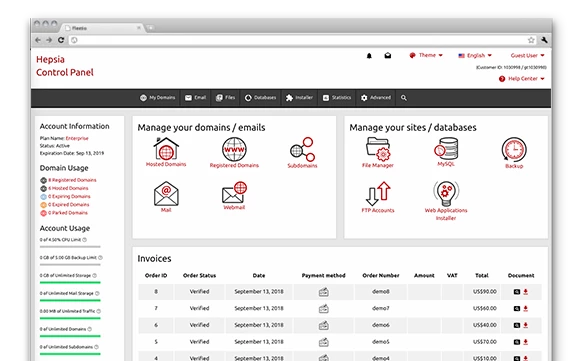
The eTesLa Servers Control Panel is one of the vital features of our Linux shared hosting platform. It represents a new and user–friendly method for managing your websites and everything associated with them. We have included all the tools that you require for your daily website administration necessities.
One of the most essential aspects of the eTesLa Servers Control Panel is that it is the only Control Panel that you will need – you will no longer have to log into different places. You can finally manage your domains, your sites and your payment transactions from a single place. Scroll down to see what else we have prepared for you.
File Manager
Manage your files and directories with a click
With the File Manager integrated into the eTesLa Servers Control Panel, you will have one of the most powerful web file management tools at hand. With it, you can upload files simply by dragging them into your browser. You can move files and folders in your account by dragging and dropping them. You can uncompress uploaded ZIP archives.
You can also right–click on a certain file or folder to access these functions.


Email Manager
Handling email accounts can be really easy
Marketing Tools
Various tools to quickly publicize your websites


Dropbox backups
Send data backups to your Dropbox account automatically
A choice of 40+ different apps to install
A choice of 40+ different apps to install


A Quick Site Installer
Many web site templates for you to install online with a single click of the mouse
Web Stats Manager
Up–to–the–minute information on your site visitors in your Control Panel


A Site Creating Instrument
Spend less cash on web development and design

Website Instruments
We incorporate numerous Website Instruments to help you promote your websites. Those include a Sitemap Generator, a GeoIP redirection tool together with an RSS News Feeds interface.

Website Installer Instrument
Using the Control Panel, it is possible to set up your very own website within minutes. Merely opt for a design template for the site and then indicate the place you would like it to be installed. That’s it. Your new site will be on the web with simply a click.

Site Creating Instrument
eTesLa Servers’s web based Site Creating Instrument will allow you to kickstart your web profile today with easy point & click movements. No coding expertise will be needed on your part. Multiple website templates to choose from.
Support
Contact Our World Class Support Team 24/7
Our dedicated team is available around the clock to assist you with any issues or questions
Call: (307) 289-7100
F.A.Q.
Frequently Asked Questions
What services do you offer?
At eTesLa Technologies, we provide a wide array of services including web development, e-commerce solutions, digital marketing, SEO optimization, brand strategy, and ongoing maintenance & support.
How do I get a quote for my project?
Getting a tailored quote is easy! Just fill out our contact form, and we’ll respond with a customized proposal to fit your project needs.
Do you provide ongoing support?
Absolutely! We offer comprehensive maintenance and support services to ensure that your digital solutions continue to perform at their best.
Can you assist with branding?
Absolutely, our brand strategy services are designed to help establish a strong and cohesive identity for your business.
How do I get started?
Contact us through our website, and our team will guide you through the initial steps to kickstart your project.
What is your approach to SEO?
We focus on boosting your website’s visibility through strategic SEO practices to attract more organic traffic.
How do you ensure project success?
Our team employs strategic planning and innovative design to deliver solutions that meet your business goals.
What makes eTesLa Technologies different?
Our commitment to innovation and customer satisfaction sets us apart, ensuring that we deliver exceptional digital solutions.
What industries do you personalize in?
We proudly collaborate with a diverse range of industries, including retail, web hosting service, digital marketing, and technology, delivering tailored solutions that meet their unique challenges.
Satisfaction Guaranteed
24/7 Award Winning Support
Our dedicated team is available around the clock to assist you with any issues or questions
30 Day Money Back Guarantee
Try our 30 day money Back Guarantee and feel like a King. Full access for 30 Days to test and publish your Site, no questions asked.
30 Days of Free Hosting
On all our annual service we provie a 30 days Free Hosting service, exept mentioned differently on each of our specific packages!